Virtualization in Unix-based system
Explaining virtualisation & containerisation using a unix-based os
Virtualization in Unix-based system
Introduction
Virtualization in Unix-based systems, including Linux, involves creating and managing virtual instances of computing resources, such as hardware, storage, and network, allowing multiple isolated environments to run on a single physical machine. This process is achieved through a combination of kernel features, hypervisors, and various user-space tools. Here’s a detailed explanation of how virtualization works under the hood:
0. What’s Virtualisation
Virtualization is a technology that allows for the creation of multiple simulated environments or dedicated resources from a single physical hardware system. It involves the abstraction of physical resources — such as servers, storage devices, and network infrastructure — into virtual counterparts, which can be used and managed independently.
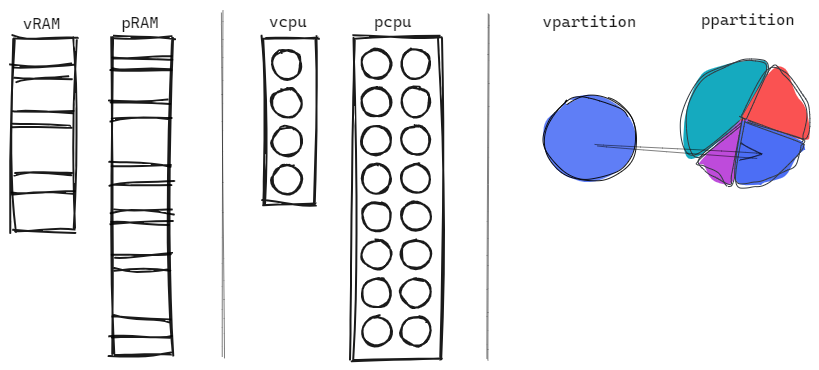
In Unix-based systems, virtualization enables the concurrent running of multiple isolated instances, often referred to as virtual machines (VMs) or containers, on a single physical machine, optimizing resource utilization and providing robust isolation and security. This process is facilitated by a combination of hardware-assisted features, hypervisors, kernel modules, and user-space tools.
1. Hardware-Assisted Virtualization
Modern processors support hardware-assisted virtualization features (Intel VT-x and AMD-V) that allow the efficient execution of multiple virtual machines (VMs).
- VMX (Virtual Machine Extensions) and SVM (Secure Virtual Machine): These extensions add new CPU modes to facilitate virtualization. The processor can switch between the host (root mode) and guest (non-root mode) execution contexts efficiently.
- VMCS (Virtual Machine Control Structure): A data structure used by the CPU to manage the state of each virtual machine.
2. Hypervisors
A hypervisor (virtual machine monitor) is software that creates and runs VMs. There are two types of hypervisors:
- Type 1 (Bare-Metal): Runs directly on the host’s hardware (e.g., VMware ESXi, Xen).
- Type 2 (Hosted): Runs on a host operating system (e.g., VMware Workstation, VirtualBox).
KVM (Kernel-based Virtual Machine) is a Type 2 hypervisor integrated into the Linux kernel.
KVM Workflow
- Loading the KVM Module:
sudo modprobe kvm sudo modprobe kvm_intel # For Intel processors
- Creating a Virtual Machine:
- QEMU: A user-space emulator that works with KVM to provide hardware emulation.
1
qemu-system-x86_64 -enable-kvm -m 1024 -smp 2 -hda /mnt/disk/ubunut.iso
2. VMX Operations:
- VMXON: Enables VMX operation.
- VMLAUNCH: Starts the guest execution.
- VMEXIT: Transfers control back to the hypervisor.
Creating virtual machines using CLI
To create a VM using virt-install utility , you should first enable virtualization in the host system
Check if you have
- Good RAM memory amount and quality
- Good CPU cores and frequency
- Enough Disk Space
- Other Driver needed
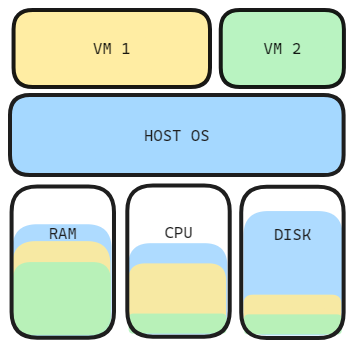
All those resources values may vary significantly depending on the intended tasks and workload on the VMs
You should also let some resources to your host OS if you’re using an invited mode
3. Containers
Containers are a lightweight form of virtualization that provides process isolation through namespaces and resource control via cgroups (control groups).
Namespaces
Namespaces provide isolation for various system resources.
- PID Namespace: Isolates process IDs.
- Network Namespace: Isolates network interfaces.
- Mount Namespace: Isolates file system mounts.
- User Namespace: Isolates user and group IDs.
- IPC Namespace: Isolates inter-process communication resources.
Example using unshare:
1
sudo unshare --mount --uts --ipc --net --pid --fork --user --map-root-user /bin/bash
Control Groups (cgroups)
cgroups limit and isolate resource usage (CPU, memory, disk I/O, etc.).
- Creating a cgroup:
1
sudo mkdir /sys/fs/cgroup/cpu/my_cgroup echo 50000 | sudo tee /sys/fs/cgroup/cpu/my_cgroup/cpu.cfs_quota_us echo $$ | sudo tee /sys/fs/cgroup/cpu/my_cgroup/tasks
Docker
Docker simplifies container management and provides tools to build, ship, and run containers.
- Running a Docker Container:
1
docker run -it ubuntu /bin/bash
4. Virtual Filesystems and Networking
- OverlayFS: A union mount filesystem that allows the creation of layers, which is used in Docker to provide image layering.
- Bridged Networking: Allows VMs and containers to be on the same network as the host, providing them with virtual network interfaces.
5. Memory Management
Virtualization involves sophisticated memory management techniques:
- Extended Page Tables (EPT) / Nested Page Tables (NPT): Hardware features that map virtual memory addresses used by VMs to physical memory addresses, reducing the overhead of memory translation.
6. I/O Virtualization
- Virtio: A virtualization standard for network and disk device drivers, providing efficient and high-performance I/O operations in virtualized environments.
Example: Setting Up a KVM Virtual Machine
Here’s a step-by-step example of setting up a VM using KVM and QEMU:
- Install KVM and QEMU:
1
sudo apt-get install qemu-kvm libvirt-bin
- Verify Installation:
1
kvm-ok  # Check if your system supports KVM
- Create a Disk Image:
1
qemu-img create -f qcow2 /var/lib/libvirt/images/myvm.qcow2 10G
- Install an Operating System:
1
virt-install --name myvm --ram 1024 --disk path=/var/lib/libvirt/images/myvm.qcow2 --vcpus 1 --os-type linux --network bridge=virbr0 --graphics none --console pty,target_type=serial --location 'http://archive.ubuntu.com/ubuntu/dists/bionic/main/installer-amd64/' --extra-args 'console=ttyS0,115200n8 serial'
7. The Cost of Abstraction in Virtualization
Virtualization achieves isolation by inserting a hypervisor between the guest OS and hardware. This abstraction layer introduces overhead at every point where the guest requires privileged operations or hardware access.
The Interception Model
A guest OS attempts to interact directly with hardware resources. Instead, the hypervisor intercepts these interactions. When the guest executes an operation that requires hardware access, the CPU traps the instruction and transfers control to the hypervisor. The hypervisor validates the operation, possibly emulates it, and returns control to the guest.
This interception is not free:
- Context save: CPU state (registers, control structures, memory mappings) must be saved when switching from guest to hypervisor
- Validation and dispatch: Hypervisor validates the operation and routes it appropriately
- Context restore: CPU state must be restored when returning to the guest
A single interception costs 200-300+ CPU cycles—equivalent to thousands of CPU instructions. I/O-heavy workloads trigger interceptions thousands of times per second.
Memory Translation Overhead
The guest OS maintains its own page tables, mapping guest virtual addresses to guest physical addresses. But guest physical addresses are not real—they exist only within the VM’s address space. The hypervisor maintains a separate mapping from guest physical addresses to host physical addresses.
Every memory access requires translation through both tables:
- Guest virtual address translates through guest page table (managed by guest OS)
- Produces guest physical address
- Guest physical address maps through host EPT/NPT table (managed by hypervisor)
- Reaches host physical address where actual memory access occurs
Without nested page table hardware support, this chain requires multiple memory references per translation. Even with hardware support, the CPU must consult two levels of page table hierarchy where a native system consults one.
Device I/O and Boundary Crossings
Device I/O operations traverse multiple abstraction boundaries. A guest application requests I/O through system calls. The guest kernel processes the request. An interception occurs. The hypervisor (or user-space emulation component like QEMU) intercepts and simulates the device. Another boundary crossing occurs—to host kernel to perform actual I/O. The return path reverses through all layers.
Each boundary crossing involves:
- Register state save and restore
- Memory protection domain changes
- Cache and TLB invalidation
- Instruction pipeline stalls
What could be a single hardware operation becomes a chain of software operations across abstraction boundaries.
Paravirtualization optimizes this by allowing the guest OS to communicate directly with the hypervisor through shared memory and hypercalls, eliminating device emulation. But the fundamental crossing of abstraction boundaries remains necessary.
Hardware Support as a Requirement
Modern hypervisors depend on hardware virtualization extensions (Intel VT-x, AMD-V). These provide efficient interception and context switching mechanisms. Without them, hypervisors must rely on binary translation and software emulation, reducing performance by 50-70%.
Even with hardware support, the abstraction layer cannot be eliminated. Optimizations reduce overhead but are bounded by the architectural requirement: the hypervisor must intercede in guest operations to maintain isolation.
Why Containers Are Fundamentally Different
Containers use a different isolation model. Instead of a hypervisor intercepting hardware access, the kernel filters operations through namespace isolation. A containerized application executes in the host kernel directly, with the kernel enforcing isolation through namespace boundaries.
A system call from a containerized process:
- Containerized process initiates a system call
- Transitions directly to host kernel without switching privilege levels
- Kernel applies namespace filters to isolate system resources (PID, network, mount, user namespaces)
- Container sees only its allocated resources
- System operation executes with isolation boundaries enforced by kernel’s namespace filtering
No interception. No context switches. No boundary crossings. No emulation layer. Overhead drops below 2%.
The Architectural Ceiling
Virtualization cannot escape the cost of abstraction. The hypervisor must mediate guest access to hardware to provide isolation. This mediation—interception, validation, emulation, context switching—cannot be entirely eliminated. Every optimization reduces overhead but remains bounded by this architectural constraint. The abstraction layer is fundamental to the virtualization model.
Conclusion

Virtualization in Unix-based systems involves a complex interplay of hardware features, kernel modules, and user-space tools. It leverages hardware support for virtualization, kernel features like namespaces and cgroups, and powerful user-space tools like QEMU, KVM, and Docker to create isolated, efficient, and scalable computing environments. This architecture enables multiple virtual environments to coexist on a single physical machine, optimizing resource utilization and providing robust isolation and security.